Simply Speech: app review

Showing posts with label app review. Show all posts

In My APPinion: Main Street Memory

Wednesday, October 14, 2015
Appy Wednesday! I hope you all are having a great week. If you have students on your caseload working on memory skills, I have an app for you! Virtual Speech Center created an app called, Main Street Memory that was created to help both children and adults with processing and recalling auditory instructions.
I was provided a copy of this app in return for a review, however, all opinions expressed in this review are my own.
 When you first open the app, you will see the main screen that is pictured above. From this screen, you can adjust settings, learn information about the app, view student reports, or get started. When you click START, you will see the screen below.
 This screen will allow you to choose which students you will be working with as well as what theme/location you want the app to use. You can choose from Jin's Jewels, Pia's Pizza, and the Sweet Shop. After you choose from those settings, you are able to choose specific type of directions you want. For example, in the pizza shop you can choose if you want one, two, or three topping orders or if you're in the sweet shop you can choose how many items and how many modifiers you want to target.
 Below if a screen shot from Jin's Jewels. The student is prompted with a direction or order from a customer. For example, "I'll take a red, a blue, and a yellow bead, please." If your student needs to hear the instructions again, he/she can tap the green speaker button at the bottom of the screen.
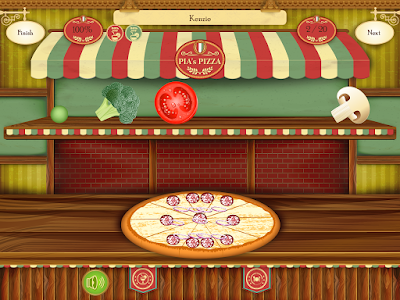
 Below is a screen shot from Pia's Pizza. The student is prompted with a pizza order such as, "I'll take a pepperoni and onion pizza!"
 Below is a screen shot from the Sweet Shop. Your student may be prompted with a customer's order such as, "Green gummy bear and pink taffy for me, please."
 After the student completed the tasks, they are able to play a "pac-man" style game as a reward.
 This app stores student data and allows you to email it which is always helpful with parent and teacher communication. Virtual Speech Center did a great job with this app. The themes are engaging to students, even my 3 year old enjoyed playing with this app. I really like that you can use this app with multiple students at once. One feature I really like about this app is that it has a background noise option. You can choose from people talking, birds chirping, or static noise. This is a great feature to use when working with auditory/verbal students. This app is great for young children, but I could see how the directions may be simple for older students and adults, depending on their individual level. Overall, I would recommend this app for students working on memory recall and following directions.
You can learn more about this app and download a copy in the iTunes store, here!


In My APPinion: Multi-Syllabic Word Party & GIVEAWAY!

Wednesday, September 30, 2015
Appy Wednesday! Raise your hand if you love a party! Me too! Recently, Luke from Home Speech Home contacted me about his new app, Multi-Syllabic Word Party! My Multisyllabic Circus activity in TpT is a big seller, so I know I am not the only one working with students on multisyllabic words. This is an easy to navigate app that will help your students understand multisyllabic words as well as give them some extra exposure and practice to these words.
I was provided with a copy of this app, however, all opinions expressed in this review are my own.
When you first open the app, you will see the screen pictured above. There are 4 activities to choose from: Tap Tap, Outline, Remember, and Say & Slice. If you choose Tap Tap, you will be prompted with pictures similar to the one below. Students are to tap each circle below the picture (one for each syllable in the word) then say they entire word. 
If you choose the Outline activity, you will see a screen like the one below. Your student is to tap and drag the pictures from the bottom of the screen into the it's matching outline (kind of like a puzzle)
After you drag the correct piece into the outline, you are prompted to tap and say the syllables in the word. 
If you choose Remember, you get to play a memory game with multisyllabic words.
Last but not least, Say & Slice! With this activity, student have to slice the letters that are different colors (for different syllables) and say it. After the letters fall off, drag them up and lock them back in.
This is a fun app that is easy enough to navigate without much direction, although directions are given before each activity is started. The app is very colorful and has engaging pictures for the kids. I really like that you have the option to choose how many syllables you want to target so it can be appropriate for each student you use it with. There isn't an option for data collection, but I don't think it's necessary for this app. The idea is more of a fun, playful way to work with multisyllabic words. This is a great app to use with students learning about multisyllabic words, articulation students, as well as students working on the phonological process of syllable deletion. 
You can learn more about this app and download a copy in the iTunes store here!
**Make sure you follow me on Instagram @simply_speech for a chance to win a copy of this app!**

In My APPinion: Adjectives by Teach Speech Apps

Sunday, September 13, 2015
Appy Sunday! The school year has started, you all have your new list of students and new IEP goals ready to go. How many of you have students with adjective goals on their caseload? If you raised your hand, I have an app for you!
Recently, Josie from Teach Speech Apps contacted me about one of her new apps, Adjectives. I was excited to check this app out because like many of you, I also have students working on adjectives. When working with young students, keeping new and fresh ways to work on goals is often key to keeping their attention. And what student doesn't like the iPad? 
Let me show you around….
When you first open the app, you will see the screen above. You can adjust the settings by tapping on the gear in the upper right hand corner of the screen. This screen allows you to choose how you want to target adjectives based on the student's need. 
Your options are:
Identify the picture that demonstrates the sentence.
Identify the adjective for the sentence.
Identify the picture- comparative adjectives.
and
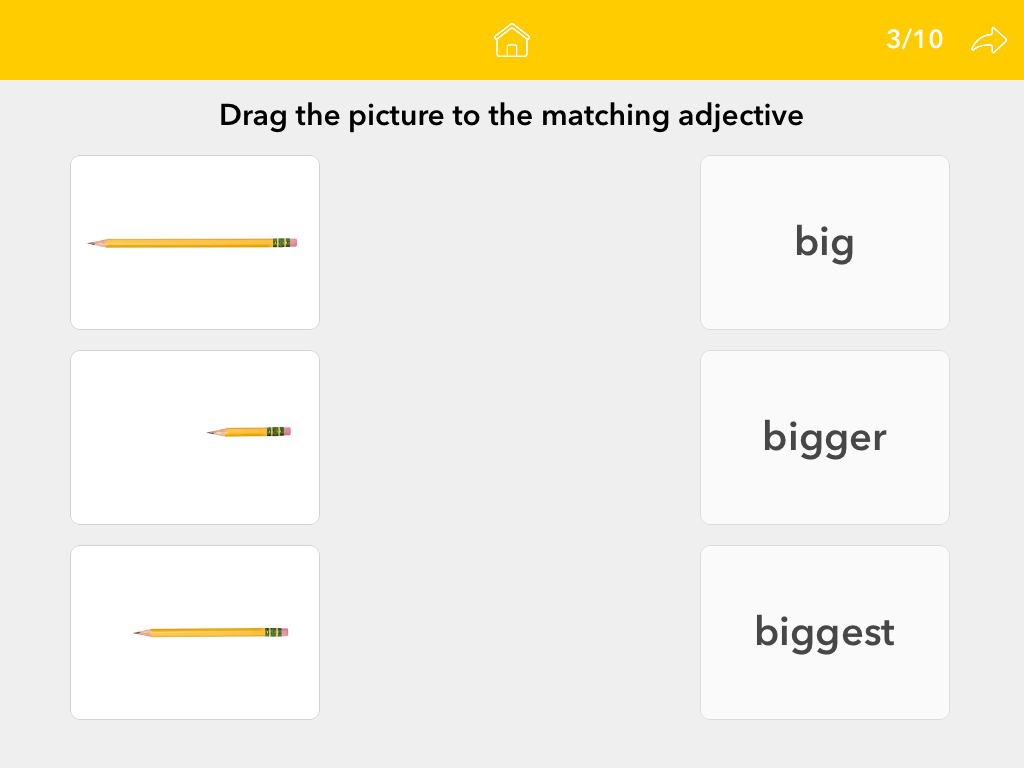
Drag and drop the picture to the matching adjective.
If you choose, identify the picture that demonstrates the sentence, you will be prompted with 10 sets of pictures. Each set includes two pictures for the student to choose from based on the prompt. In the settings, you can choose to have the prompt written or to hear the prompt. This is a great option for both readers and non readers to be able to navigate this app independently. 
If you choose, identify the adjective for the sentence, you are prompted with 10 pictures and sentences like the one above. The student has to tap on the adjective at the bottom of the screen that correctly completes the sentence. 
If you choose, identify the picture- comparative adjectives you are prompted with 10 sets of pictures like in the screen above. The student has to tap on the correct picture based on the sentence prompt. 
Last but not least, if you choose drag and drop the picture to the matching adjective, you will see two columns. One column has pictures and the other has adjectives. The students is to drag the picture to the correct adjective.

I love that this app includes so many different ways to target adjectives. I have multiple students working on adjectives in therapy, but even though they are all at different levels with this goal, I can still use this app with all of them. The option to read or hear the prompt makes this app great for both readers and non-readers. The pictures are bright, colorful, and engaging. I also like that each category prompts with a set of 10- this makes data tracking easy. I do wish there was an option to store the students' data on the app, but other than that, I feel like this app is fun, engaging, and well worth the price. 
You can download a copy of this app in the iTunes store here!
Make sure you follow me in Instagram @simply_speech for a chance to win a copy of this app!

**Josie did provide me with a copy of the app in exchange for a blog review. However all opinions expressed in this review are my own**

Questions Hunt {App Review}

Monday, August 31, 2015
Appy Monday! Today I have a new app to share with you from Virtual Speech Center! I am pretty excited about this one because I don't know one SLP that has a caseload void of a goal regarding asking or answering questions. This seems to be something we all work on. Speaking personally, I know I can always use a fun new way to target this goal. 
Disclaimer: VSC did provide me with a copy of this app, however, all opinions expressed in this review are my own.
When you first open the app, you are brought to the screen shown above. Here is where you can adjust the settings, get information on the app, access student reports, or simply start the app. To begin, click on start.You are then brought to a page where you can add/choose the students you will be working with. I really love apps that allow for multiple users at a time, and this app is one of them. After you choose your student(s), you are then prompted to choose what type of questions (yes/no, what, where, who, when, why, how) as well as well as the scene the questions will be presented at (beach, park, store, airport, school, camping) My students really enjoy choosing their own scenes!
The student who's turn it is will have his/her name presented at the top of the screen. In the picture above, the airport scene was chosen. The student is to click on the question marks. Each question mark will prompt the student with a question. Another thing I really like about this app is the option to change the questions from receptive to expressive by clicking on the green box at the top of the screen.
Example of a WHY question in the fishing scene. 
Example of a YES/NO question in the beach scene. 
Example of a WHEN question in the school scene. 
When you are finished, you can access the students' individual reports. There is an option to email the report. I like this option for quick and valuable communication with both parents and teachers.
My students and I have both really enjoyed this app. I love that there is a wide range of questions available- with both a receptive and expressive option. I have used this app for both practice on answering questions as well as an assessment tool to see progress with answering different types of questions. The graphics are colorful and inviting and price is very fair. If you are looking for a new fun way to target answering questions, I would absolutely recommend this app!
You can learn more about this app and download a copy in the iTunes store, here!

In My APPinion: I Can Have Conversations With You

Wednesday, April 22, 2015
Disclaimer: A copy of this app was provided to me by the creator, however, all opinions expressed in this review are mine. 
Appy Wednesday! Technology has become a huge part of our therapy lives. There are apps out there to help us work on almost every kid of skill with our students from grammar to math! I was recently contacted by Karen, creator of the app, I Can Have Conversations With You.  This app was created specifically for those with autism, PDD, and Asperger's syndrome who are 6 years or older, can read, and are talking in sentences. The goal of this app is to help these students become independent communicators. As Karen's website states, this is "much more than just an app." Boy is she right! This app is very comprehensive and really digs deep into conversations, interactions, what others are thinking, and how others feel while communicating. 
The lessons begin as soon as the app is opened. Instructions are given along the way, so students can use this app independently. This app is ideal to use with one student at a time. In fact, it would be perfect to load onto an iPad that belongs to a student so he/she could work with this app frequently, both at school and at home. The app is easy to follow and will remember where the student stopped so he/she can pick back up right where they left off.
The app includes many videos of conversational partners interacting. 
Above is a screen shot of one of the videos included. 
After the video is over, the student is prompted with a variety of questions to help him/her truly understand what happened and how to hold a conversation about experiences. For example, in one video, a little girl visits her grandfather for the day. After the video is over, the student was taken through a conversation between the little girl and her father about her day. The student identifies conversational partners, relationships, how they feel, and what the partners want to say.
This app targets feelings, correct/incorrect responses, on/off topic responses, and more. In addition, the student is also able to record themselves as if they were part of the conversation. 
After each question, the child is reinforced with "that was a good try" for an incorrect response, or a stimulating picture and music for a correct response. 
As you can see below, Karen is also very encouraging along the way!
When the modules are completed, the student is rewarded with a certificate. An evaluation of the student's progress is also provided along with recommendations for future modules to add on to the app. 
As stated before, this app is very comprehensive and includes a great one on one experience for students to dive deep into conversations. I love that this app does not require adult instruction. Students can jump right into the app and start working because it is guided along the way. This app wouldn't necessarily work with group therapy because it keeps track of the student's responses to create an individual report at the end. It would be a great purchase for families or private therapists to make for their child/student. Conversations are a part of our daily lives no matter if we are at school, work, walking down the grocery isle, or talking to a grandparent on the phone. The skill of communicating with a partner can be difficult to teach. Thank you Karen for creating this in depth app to help our students that struggle with social communication!
To learn more about this app or to download a copy of the app, visit the iTunes store here!

Let's Yapp About That App!

Saturday, March 7, 2015
One of the things that I love about being a speech blogger is that I get to test out and report on apps that are relevant to our line of work. It's no secret that iPads are a huge part of our therapy lives these days. Apps have become key tools in a lot of our therapy sessions, so why not learn more about what apps are out there? In July of 2014, Yapp Guru contacted me about becoming an "expert" app reviewer and joining their team! Haven't hear of Yapp Guru? You are missing out on a great website!
Yapp Guru is a website where other SLPs and OTs post reviews and opinions on apps. This is a great site to visit if you are debating on spending $60 on an app that you just aren't sure is worth the money. This is also a great site to go to if you are looking for an app to target a specific age group or goal. Don't stress, we have done all the work for you! They have a voting feature where you can vote on apps so your opinion counts, too! We are having a little March Madness Contest over at Yapp Guru and challenging each other to write more reviews this month. You can check out my profile and read my app reviews here!

In My APPinion: Sequencing Post Office

Thursday, February 12, 2015
Appy Thursday! A few days ago I posted an app review on a sequencing app by SOAR. Well, today I am back with another sequencing app, Sequencing Post Office by Virtual Speech Center.  I am super excited to share this app review with you because I am sure I am not the only one that could use some new ways to practice sequencing goals. 
Virtual Speech Center did provide me with a copy of this app, however, all opinions expressed in this app are my own. 
Let's get started!
When you first open the app, you are brought to the screen shown above. From this page, you can get information about the app, view student reports, adjust the app settings, or just get ready to play!
Once you hit start, you are prompted to add or choose the students that are working during that session. I really like the fact that this app allows for multiple players, very fitting for school based therapists. 
After you choose the students, you are then prompted to choose which activities your student(s) will complete. You can choose as many or as little as your would like out of the 65 activity options. A few examples include: making a sandwich, brushing teeth, taking a bath, playing baseball, and buying groceries. 


Once you choose your activities and hit next, you are shown pictures that are out of order for an activity. You are able to decide how many sequencing steps you want the student to compete at the top of the screen (2, 3, or 4)  The student is to drag the pictures at the bottom of the screen into the correct numbered order. If the child puts the pictures in the correct sequence order, he/she earns one stamp. 
Once enough stamps are earned, the student(s) get to play a game! A screen shot from the game is pictured above. 
Once your session is completed, the app stores your students' data for future reference. This information can also be emailed, which is great for parent and teacher communication. 
My students and I enjoyed this app. I thought it was a great way for me to both teach and assess sequencing skills. Since it's on the iPad, the kids were excited to work on this skill. They especially loved the fact that they got to play a game once they earned enough stamps. You can download this app for only $4.99 in the iTunes store here!
Thank you Virtual Speech Center for the chance to review this app!

In My APPinion: Step By Step by SOAR Therapy LLC

Thursday, February 5, 2015
Appy Thursday! I hope you all have had a great week… it's almost Friday! I wanted to share a new sequencing app with you called, Step By Step. I have had quite a few students on my caseload with sequencing goals. One problem that I have frequently run into is running out of sequencing activities. I don't want to use the same cards every week with my students because they start to memorize the order the cards go into. So when I was contacted  by SOAR Therapy to review this app, I was very interested in seeing what kind of sequencing activities this app had to offer. 
A copy of this app was provided to me, however, all opinions expressed in this review are my own. 
When you first open the app, you are welcomed by this screen. You are able to create a log in account or continue with the one you are logged into.
From there, you are prompted to choose KIDS or ADULTS. Depending on what category you choose, will determine the sequencing activities you are able to complete. For example, if you choose kids, you are prompted with activities such as: buying a candy bar, cleaning your room, carving a pumpkin, painting a picture, etc. If you choose adults, you are prompted with activities such as: doing laundry, locking a door, ironing a shirt, and telling time. This app comes with 2 activities for both kids and adults. You can purchase additional activities for .99 a piece. 
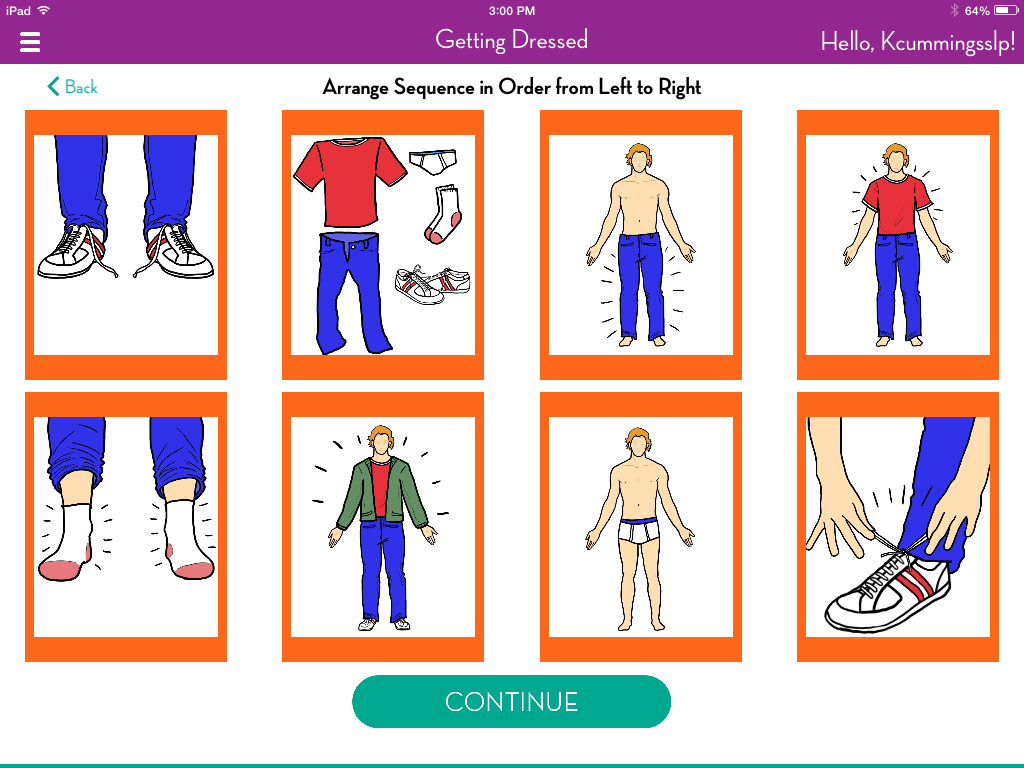
Below is a screen shot from the Getting Dressed activity. To complete this activity, simply drag the pictures into the correct order to complete the sequence. 
Once your student finishes the activity, he/she is prompted with a score and the option to Try Again or See Results. 
Below is a screen shot from the results page. 

This app was very easy to navigate and figure out without having to watch a video tutorial. I like that there are multiple activities divided into adult and kid categories. The graphics will not make an adult client feel like the are using a child's app, which is a big deal for SLPs working in hospital/rehab settings. I also like that this app keeps a history of each user and their scores. This is great for paperless data collection. Adding a notes section to record specific information about how the client did would be helpful. If you think this app would be something you would like to try, download a free copy from the iTunes store here. Like I said earlier, the free version of this app contains 2 activities for adults and 2 activities for kids. However, if there are specific tasks you want to work on with a student, each additional activity is .99 or $9.99 for a whole category (still very reasonable.) My students love when they have the option to working on a skill on the iPad. Thank you SOAR Therapy for the chance to review this app!


Powered by Blogger.